

AI Still Needs the Human Who Knows Where the Edges Are
When AI misses the obvious execution path


A small email icon, a Microsoft sign-in failure, and a reminder that automation without experienced judgment still breaks in simple ways.
The Setup
I clicked a small icon in an AI interface.
The tooltip said “Open email.”
That sounded useful. It looked like one of those small product improvements that saves time. Click once, open an email, keep moving.
Then Microsoft stopped the flow with this message:
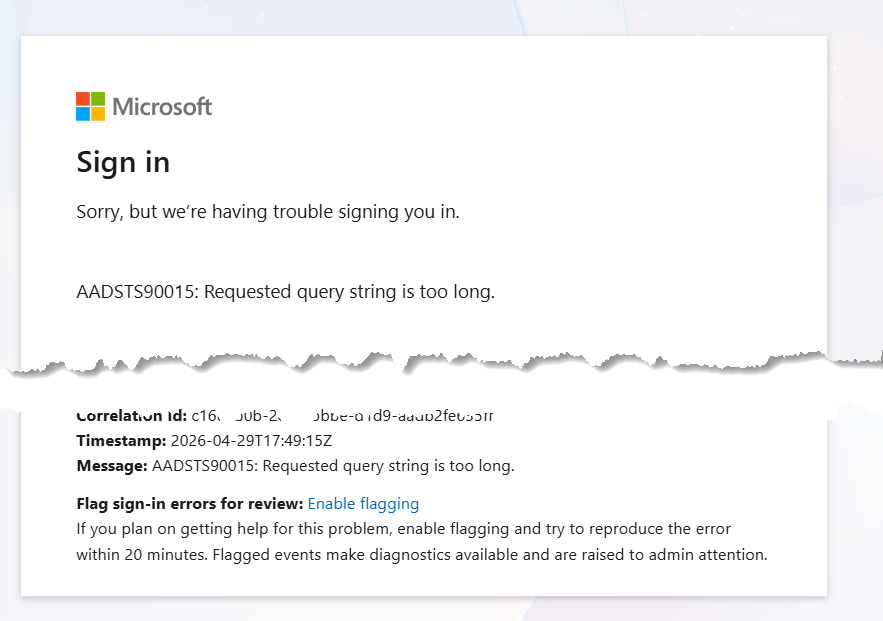
That is not a user message.
That is not a business message.
That is a developer diagnostic that escaped into the user experience.
What the Screenshots Show
The screenshots show the problem clearly.
The first screenshot shows the promise: a small convenience feature. Open email.
The second screenshot shows the failure: a Microsoft sign-in screen that exposes a raw identity provider error to the user.
That gap is where experienced humans still matter.
The Technical Answer
Here is the exact assessment I made when reviewing the error:
The limitation is known enough to design around.
Microsoft documents AADSTS90015 as QueryStringTooLong, meaning the sign-in request sent to Microsoft Entra exceeds the maximum query string length it accepts. Microsoft’s error-code reference lists it directly. Microsoft also states its error-code documentation is for developer and admin guidance, and should not be used by the client itself. (learn.microsoft.com)
What likely happened:
You clicked the “Open email” icon.
The app tried to open Outlook or Microsoft sign-in using a URL.
That URL likely included too much data in the query string, often subject, body, return URL, state, redirect data, or encoded content.
Microsoft Entra rejected it before the user reached the email experience.
This is not a user problem.
This is a product design problem.
A good implementation would do one of these:
Limit the length of the mailto or compose URL before launching it.
Copy the content to the clipboard and tell the user.
Open a blank email and let the user paste.
Create a draft server-side.
Use POST or stored state instead of stuffing content into the URL.
Show a friendly message like:
“This query string is too long to open automatically. The content has been copied to your clipboard.”
The exact maximum length varies by browser, service, identity provider, proxy, and redirect chain. But the failure mode is predictable. Microsoft Q&A threads around this error point to oversized request parameters, cookies, RelayState, or redirect payloads as common causes. One Microsoft answer also references a 4096-byte limit on request parameters in a SAML context. (learn.microsoft.com)
So your criticism is fair.
The platform should not expose a raw identity-provider error to a normal user after clicking a convenience icon. It should detect the oversized request before opening Microsoft sign-in.
The Business Lesson
This is why AI is useful, but still not far enough along to own the full context of what it provides.
AI saw a task.
Open email.
An experienced human sees the system boundary.
Opening an email is not one action. It crosses product UX, browser behaviour, URL limits, Microsoft Entra authentication, redirect handling, message size, state management, and user trust.
That is the difference.
AI often completes the visible task.
Experienced humans understand the failure path.
Where the Design Failed
The interface offered a shortcut without checking whether the shortcut would work.
That is a product flaw.
A better system would test the payload size before launching the email flow. It would know when content is too large for a query string. It would avoid sending the user to Microsoft sign-in with a request that is already likely to fail.
The user should never see AADSTS90015 after clicking “Open email.”
The user should see something useful:
“This query string is too long to open automatically. The content has been copied to your clipboard.”
That message preserves trust.
It explains the issue.
It gives the user the next step.
It hides the internal machinery.
That is product thinking.
The Human Advantage
This is the value of experience.
A junior system sees an error.
An AI system explains an error.
An experienced architect asks why the user saw the error at all.
That question changes the solution.
The issue is not Microsoft Entra.
The issue is not the user.
The issue is the design choice that allowed a known technical boundary to leak into the user experience.
AI is getting better at generating features.
It is less reliable at understanding the limits around those features.
Those limits often come from years of scar tissue:
• Browsers have limits.
• Identity systems have limits.
• URLs have limits.
• Redirect chains have limits.
• Users have patience limits.
A Better Rule
When software crosses a system boundary, design the failure path first.
The happy path is easy.
The failure path tells you whether the product was designed by someone who understands production systems.
That is where AI still needs experienced humans.
Not because humans type faster.
Because humans know where systems break.